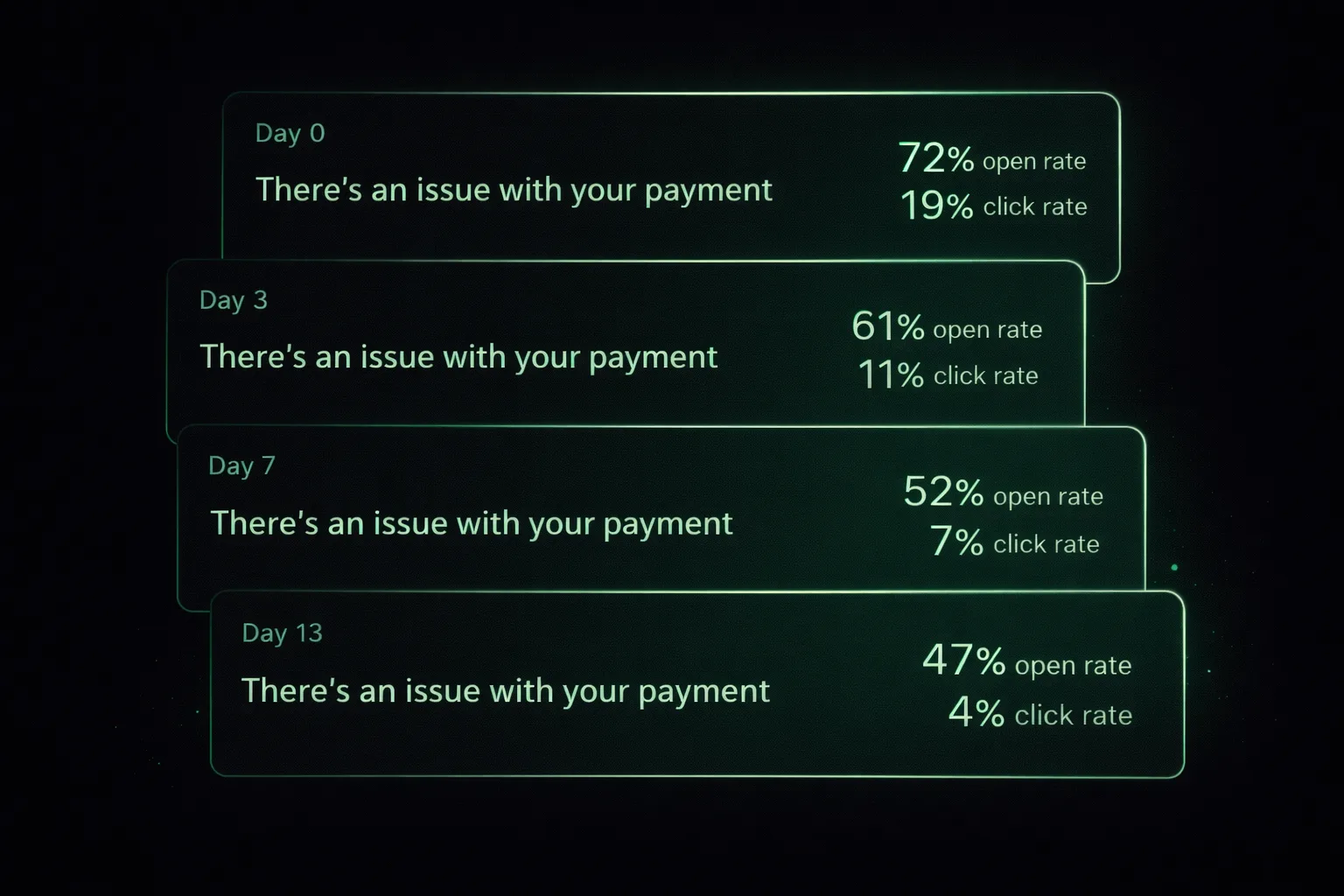
How dunning email sequences work
A dunning sequence is a timed series of emails sent after a subscription payment fails. Each email serves a different purpose — notification, reminder, urgency, alternative options, final warning — escalating progressively over 10–21 days.
The goal isn't to pressure customers. Most failed payments aren't intentional — the customer's card expired, had a temporary issue, or they simply missed the first email. The sequence creates multiple low-friction opportunities to resolve the issue before the subscription is cancelled.
Timing and spacing: when to send each email
| Day | Tone | |
|---|---|---|
| 0 | First notice + retry | Helpful, neutral |
| 3 | Gentle reminder | Friendly follow-up |
| 7 | Urgency shift | Direct — access at risk |
| 10 | Backup card request | Problem-solving |
| 13 | Final warning | Clear deadline |
| 30–60 | Win-back (post-lapse) | Warm, no pressure |
#01The first notice: helpful, no urgency
Timing: Day 0 — immediately after failure
Most first-time failures are recoverable with a single retry or a quick card update. The tone here should be a helpful heads-up, not an alarm.
Subject line options
Email body
Hi {{first_name}},

We ran into a problem processing your payment of {{amount}} for {{product_name}}.

This usually happens because of an expired card or a temporary bank issue — nothing to worry about.

To keep your account active, please update your payment method:

→ Update payment details

We'll automatically retry the payment in 2 days. If your card is already up to date, you don't need to do anything.

Questions? Hit reply and we'll sort it out.

— {{sender_name}} at {{company_name}}Keep the CTA link above the fold. Use a direct link to the payment update page, not the login screen.
#02The gentle reminder: still helpful
Timing: Day 3 — after the first retry fails
The customer may have missed the first email. Reiterate calmly. This email gets high open rates because it feels like a second notification, not a threat.
Subject line options
Email body
Hi {{first_name}},

We tried processing your payment of {{amount}} again — but it still isn't going through.

Your {{product_name}} account is still active, but you'll need to update your payment details to keep it that way.

→ Fix my payment

It takes about 30 seconds. Once updated, we'll charge the outstanding amount and you're back to normal.

Need help? Reply to this email.

— {{sender_name}}Don't repeat the exact subject line from email 1. Vary the wording so it doesn't look like a copy-paste sequence.
#03The urgency shift: access at risk
Timing: Day 7 — urgency begins
This is where the tone changes. The customer now knows they have a problem. Be direct about the consequence without being threatening.
Subject line options
Email body
Hi {{first_name}},

We've been unable to collect payment for {{product_name}} for the past 7 days.

If this isn't resolved in the next 7 days, your account will be suspended.

We'd hate to lose you — and this is almost certainly a fixable issue.

→ Update my payment method now

Once updated, your account stays active and we'll process the outstanding payment immediately.

If you're having trouble with the update, reply here and we'll help directly.

— {{sender_name}}Name the consequence (suspension) and the deadline. Customers need this to prioritise the action. Add a support link or reply CTA for customers who are confused.
#04The backup card ask
Timing: Day 10 — backup payment request
Some customers genuinely can't fix their primary card quickly (e.g. a replacement card is in the mail). Offering a backup card as an alternative increases recovery.
Subject line options
Email body
Hi {{first_name}},

We know payment issues happen — sometimes a new card is still in the mail, or the issue is on the bank's end.

If you have a second card available, you can add it now to keep your {{product_name}} subscription active:

→ Add a backup payment method

Your primary card will still be kept on file. The backup is just there to make sure your subscription doesn't lapse while you sort out the main card.

Your account is currently still active. We're rooting for you to stay.

— {{sender_name}}This email captures a subset of customers that the standard update-card email misses. It's a meaningful recovery lever that most basic dunning setups skip.
#05The last chance: clear deadline
Timing: Day 13 — final warning
Be direct. This is the last email before the subscription lapses. State the date, state the consequence, keep the CTA as visible as possible.
Subject line options
Email body
Hi {{first_name}},

We've been trying to reach you about your failed payment for {{product_name}}.

Unless we receive payment by {{cancellation_date}}, your account will be cancelled and you'll lose access to your data.

→ Save my account now

This is our final notice before cancellation.

If you've intentionally decided to cancel, no action is needed. But if you want to stay — even one more week — please update your payment method now.

— {{sender_name}}Include a specific date, not 'tomorrow' if possible. Personalisation increases action rates. Keep the email short — if they haven't acted by now, long emails won't help.
#06The win-back: after cancellation
Timing: Day 30–60 — after lapse (win-back)
A surprising number of customers who lapse on payment failure will resubscribe if you reach out 30–60 days later. They often experienced a temporary issue and assumed their access was gone forever.
Subject line options
Email body
Hi {{first_name}},

Your {{product_name}} account was cancelled last month due to a payment issue.

We kept your data intact in case you want to come back.

If the timing wasn't right before, or if the payment issue was temporary, we'd love to have you back. You can reactivate right now:

→ Reactivate my account

If you'd rather not continue, that's completely fine — and we'll remove your data at your request.

— {{sender_name}}Win-back emails have surprisingly high conversion rates — often 10–20% of lapsed accounts. Don't skip this step.
Let MRRescue send all of this automatically
Connect Stripe in 5 minutes. MRRescue runs the full sequence — retries, emails, backup card capture — with your branding.
Start free — no credit card →Best practices and common mistakes
Send the first email within the hour
Immediate notifications catch customers before they forget the context of the failed charge. Same-day emails have significantly higher action rates than next-day sends.
Link directly to the payment update page
Every extra click you add drops conversion. Link to the exact page where the customer can update their card — not to your login page, not to billing settings.
Use merge tags for personalisation
{{first_name}}, {{product_name}}, {{amount}}, {{cancellation_date}}. Personalised emails perform better. Automated sequences that lack personalisation feel generic and get lower response rates.
Don't send more than 5 emails
Beyond 5 emails in a sequence, you start generating unsubscribes and spam complaints. If a customer hasn't updated their payment after 5 attempts, they either can't or have decided not to.
Don't skip the win-back
Post-lapse win-back emails are underused. A 10–20% reactivation rate on lapsed accounts is common. Many customers will return if you remind them that their data is still there.
Test subject lines
Dunning email open rates are typically 40–60% (higher than marketing emails). But the right subject line still matters — especially for the final warning, where the open rate directly determines whether the subscription is saved.
Related reading
What is dunning?
The full explainer on dunning and why it matters
How to Reduce Involuntary Churn
The complete guide to stopping payment-related cancellations
MRRescue: Failed Payment Recovery
Automated dunning for Stripe SaaS
MRRescue: Win-back Campaigns
Automated post-lapse re-engagement sequences
Stripe Decline Codes
Adapt your email copy to each decline code for better recovery
Frequently asked questions
How many dunning emails should I send?
3–5 emails over 10–21 days is the industry standard. Fewer than 3 leaves recoverable revenue on the table; more than 5 risks complaints and unsubscribes. Space them 3–4 days apart, starting immediately after the failure.
What subject line gets the most opens for dunning emails?
Direct, non-alarmist subject lines outperform urgent ones. "There's an issue with your payment" consistently outperforms "URGENT: Your account will be cancelled." Lead with the problem, not the consequence.
Should dunning emails come from a person or a company?
From a named person (e.g. 'Alex from MRRescue') typically gets higher open rates for B2B SaaS than from a brand name. For consumer SaaS, brand names perform comparably. Test both for your audience.
What tone should dunning emails use?
Calm, helpful, and non-accusatory. Most failed payments aren't intentional — the customer's card expired or had a temporary issue. Treat the email as a helpful heads-up, not a collections notice. Aggressive language increases unsubscribes and damages the relationship even when payment is recovered.
What should the CTA in a dunning email link to?
Link directly to a hosted payment update page — not to your login page, dashboard, or billing settings root. Every extra click you add loses a percentage of customers. The ideal is a one-click link that takes the customer directly to the payment update form.
Automate the whole sequence with MRRescue
Skip the manual setup. MRRescue sends branded dunning emails with smart retries, backup card capture, and win-back campaigns — all on top of your existing Stripe account.
Start free — 14-day trial →